Permanently remove a rule and its Shopify delivery customization.
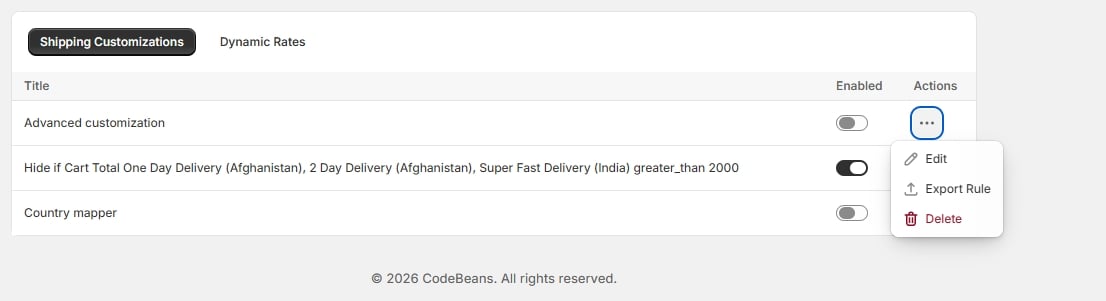
Open the row menu for the rule you want to remove and choose Delete.
Row menu — Edit / Export Rule / Delete
Deleting a rule removes its underlying Shopify delivery customization as well as the app’s record of it — the shipping methods it affected immediately return to their default behavior at checkout.
Deletion is permanent. If you might want the rule back later, use Export Rule first — see Import and export — so you can re-import it if needed.
{"docsConfig":{"theme":"mint","$schema":"https://mintlify.com/docs.json","name":"Codebeans Shipping Rules Pro","colors":{"primary":"#1F8C8C","light":"#3FC1C1","dark":"#1F8C8C"},"logo":{"light":"https://mintcdn.com/codebeans-shipping-rules-pro/q4ulWG3dWji5cRla/logo/light.svg?fit=max\u0026auto=format\u0026n=q4ulWG3dWji5cRla\u0026q=85\u0026s=5f6b775b92ec2d37f47bcfd09b5e692d","dark":"https://mintcdn.com/codebeans-shipping-rules-pro/q4ulWG3dWji5cRla/logo/dark.svg?fit=max\u0026auto=format\u0026n=q4ulWG3dWji5cRla\u0026q=85\u0026s=c0511cdaa36aa0ab0e58148c7db5d702","href":"https://apps.shopify.com/cb-advance-shopping-rules"},"favicon":"https://mintcdn.com/codebeans-shipping-rules-pro/q4ulWG3dWji5cRla/logo/icon.png?fit=max\u0026auto=format\u0026n=q4ulWG3dWji5cRla\u0026q=85\u0026s=a528b6dfe48e995fa10507b207bbf53b","navbar":{"links":[{"icon":"mail","href":"mailto:support@shopylyst.com","label":"Support"},{"icon":"globe","href":"https://codebeans.net","label":"Codebeans"}],"primary":{"type":"button","label":"Install app","href":"https://apps.shopify.com/cb-advance-shopping-rules"}},"footer":{"socials":{"website":"https://codebeans.net"}},"search":{"prompt":"Search the docs..."},"icons":{"library":"lucide"},"contextual":{"options":["copy","view","chatgpt","claude"],"display":"header"},"styling":{"latex":false},"navigation":{"pages":[]}},"deployment":{"deploymentMetadataValue":{"subdomain":"codebeans-shipping-rules-pro","hasAudioNarration":false,"actualSubdomain":"codebeans-shipping-rules-pro","customDomains":[],"gitSource":{"type":"github","owner":"codebeans-shopify","repo":"codebeans-advance-shipping-rules","deployBranch":"mintify-main","contentDirectory":"","isPrivate":true,"mountPath":"","label":""},"entitlements":{"AI_CHAT":{"status":"DISABLED"},"WEB_MCP":{"status":"DISABLED"},"NARRATION":{"status":"DISABLED"}},"buildId":"6acf8188ce756699a3d8e0c1","clientVersion":"0.0.4167","searchFilterCounts":[{"language":"default","tag":"Shipping customizations","count":4},{"language":"default","tag":"Getting started","count":4},{"language":"default","tag":"Managing rules","count":4},{"language":"default","tag":"Shipping organizers","count":4},{"language":"default","tag":"Dynamic rates","count":2},{"language":"default","tag":"Plans","count":2},{"language":"default","tag":"Support","count":1}]},"assistantConfig":{"enableAskAiButton":false,"enableStarterQuestions":false,"enableContextualStarterQuestions":false,"enableAskAiSearchBar":true},"basePath":"","hasChatPermissions":false,"hasWebMcpPermissions":false,"toggles":[{"name":"kill-isr","enabled":true,"variant":{"name":"disabled","enabled":false,"feature_enabled":true},"impressionData":false},{"name":"custom-rbac-roles","enabled":true,"variant":{"name":"disabled","enabled":false,"feature_enabled":true},"impressionData":false},{"name":"agent-mintlify-slack","enabled":true,"variant":{"name":"disabled","enabled":false,"feature_enabled":true},"impressionData":false},{"name":"agent-integrations-settings","enabled":true,"variant":{"name":"disabled","enabled":false,"feature_enabled":true},"impressionData":false},{"name":"rbac-expansion","enabled":true,"variant":{"name":"disabled","enabled":false,"feature_enabled":true},"impressionData":false},{"name":"automations-pr-grouping","enabled":true,"variant":{"name":"disabled","enabled":false,"feature_enabled":true},"impressionData":false},{"name":"custom-prefix","enabled":true,"variant":{"name":"disabled","enabled":false,"feature_enabled":true},"impressionData":false},{"name":"analytics-v7","enabled":true,"variant":{"name":"disabled","enabled":false,"feature_enabled":true},"impressionData":false},{"name":"user-flows-analytics","enabled":true,"variant":{"name":"disabled","enabled":false,"feature_enabled":true},"impressionData":false},{"name":"no-publish-flow","enabled":true,"variant":{"name":"disabled","enabled":false,"feature_enabled":true},"impressionData":false},{"name":"workos-onboarding","enabled":true,"variant":{"name":"disabled","enabled":false,"feature_enabled":true},"impressionData":false},{"name":"snapshot-serving-live","enabled":true,"variant":{"name":"disabled","enabled":false,"feature_enabled":true},"impressionData":false},{"name":"stripTemperatureMiddleware","enabled":true,"variant":{"name":"disabled","enabled":false,"feature_enabled":true},"impressionData":false},{"name":"support-platform-pylon-zendesk","enabled":true,"variant":{"name":"disabled","enabled":false,"feature_enabled":true},"impressionData":false},{"name":"snapshot-serving","enabled":true,"variant":{"name":"disabled","enabled":false,"feature_enabled":true},"impressionData":false},{"name":"instant-rollback","enabled":true,"variant":{"name":"disabled","enabled":false,"feature_enabled":true},"impressionData":false},{"name":"granular-notifications-server","enabled":true,"variant":{"name":"disabled","enabled":false,"feature_enabled":true},"impressionData":false},{"name":"granular-notifications","enabled":true,"variant":{"name":"disabled","enabled":false,"feature_enabled":true},"impressionData":false},{"name":"automations-fable","enabled":true,"variant":{"name":"disabled","enabled":false,"feature_enabled":true},"impressionData":false},{"name":"fixed-ai-action-pricing","enabled":true,"variant":{"name":"disabled","enabled":false,"feature_enabled":true},"impressionData":false},{"name":"automation-resolve-merge-conflict","enabled":true,"variant":{"name":"disabled","enabled":false,"feature_enabled":true},"impressionData":false},{"name":"scoped-publishing","enabled":true,"variant":{"name":"disabled","enabled":false,"feature_enabled":true},"impressionData":false},{"name":"mintql","enabled":true,"variant":{"name":"disabled","enabled":false,"feature_enabled":true},"impressionData":false},{"name":"page-level-analytics","enabled":true,"variant":{"name":"disabled","enabled":false,"feature_enabled":true},"impressionData":false},{"name":"editor-version-history-v2","enabled":true,"variant":{"name":"disabled","enabled":false,"feature_enabled":true},"impressionData":false},{"name":"billing-page-v2","enabled":true,"variant":{"name":"disabled","enabled":false,"feature_enabled":true},"impressionData":false},{"name":"full-page-search","enabled":true,"variant":{"name":"disabled","enabled":false,"feature_enabled":true},"impressionData":false},{"name":"workspace-projects","enabled":true,"variant":{"name":"disabled","enabled":false,"feature_enabled":true},"impressionData":false},{"name":"assistant-v5","enabled":true,"variant":{"name":"disabled","enabled":false,"feature_enabled":true},"impressionData":false},{"name":"fork-pr-previews","enabled":true,"variant":{"name":"disabled","enabled":false,"feature_enabled":true},"impressionData":false},{"name":"revalidation-jwt","enabled":true,"variant":{"name":"disabled","enabled":false,"feature_enabled":true},"impressionData":false},{"name":"workos-sso-scim","enabled":true,"variant":{"name":"disabled","enabled":false,"feature_enabled":true},"impressionData":false},{"name":"hobby-abuse-scan","enabled":true,"variant":{"name":"disabled","enabled":false,"feature_enabled":true},"impressionData":false},{"name":"dashboard-inbox","enabled":true,"variant":{"name":"disabled","enabled":false,"feature_enabled":true},"impressionData":false},{"name":"workos-signup","enabled":true,"variant":{"name":"disabled","enabled":false,"feature_enabled":true},"impressionData":false},{"name":"turbopuffer-dual-write","enabled":true,"variant":{"name":"disabled","enabled":false,"feature_enabled":true},"impressionData":false},{"name":"workos-enabled","enabled":true,"variant":{"name":"disabled","enabled":false,"feature_enabled":true},"impressionData":false},{"name":"approve-review-flow","enabled":true,"variant":{"name":"disabled","enabled":false,"feature_enabled":true},"impressionData":false},{"name":"editor-metadata","enabled":true,"variant":{"name":"disabled","enabled":false,"feature_enabled":true},"impressionData":false},{"name":"sso-setup-deadline-banner","enabled":true,"variant":{"name":"disabled","enabled":false,"feature_enabled":true},"impressionData":false},{"name":"turbopuffer-serve","enabled":true,"variant":{"name":"disabled","enabled":false,"feature_enabled":true},"impressionData":false},{"name":"live-agents","enabled":true,"variant":{"name":"disabled","enabled":false,"feature_enabled":true},"impressionData":false},{"name":"starter-pricing","enabled":true,"variant":{"name":"control","enabled":true,"payload":{"type":"string","value":"control"},"feature_enabled":true},"impressionData":false},{"name":"llms-txt-v2","enabled":true,"variant":{"name":"disabled","enabled":false,"feature_enabled":true},"impressionData":false}],"googleFontsInlined":false},"customCss":[],"page":{"pagePath":"managing-rules/deleting","slug":"/managing-rules/deleting","pageMetadata":{"title":"Deleting a rule","description":"Permanently remove a rule and its Shopify delivery customization.","icon":"trash-2","href":"/managing-rules/deleting"},"description":{"compiledSource":"\"use strict\";\nconst {jsx: _jsx} = arguments[0];\nconst {useMDXComponents: _provideComponents} = arguments[0];\nfunction _createMdxContent(props) {\n const _components = {\n p: \"p\",\n ..._provideComponents(),\n ...props.components\n };\n return _jsx(_components.p, {\n children: \"Permanently remove a rule and its Shopify delivery customization.\"\n });\n}\nfunction MDXContent(props = {}) {\n const {wrapper: MDXLayout} = {\n ..._provideComponents(),\n ...props.components\n };\n return MDXLayout ? _jsx(MDXLayout, {\n ...props,\n children: _jsx(_createMdxContent, {\n ...props\n })\n }) : _createMdxContent(props);\n}\nreturn {\n default: MDXContent\n};\n","frontmatter":{},"scope":{}},"pageType":"default","mdx":{"mdxSource":{"compiledSource":"\"use strict\";const{Fragment:_Fragment,jsx:_jsx,jsxs:_jsxs}=arguments[0];const{useMDXComponents:_provideComponents}=arguments[0];function _createMdxContent(props){const _components={a:`a`,p:`p`,strong:`strong`,..._provideComponents(),...props.components},{Frame,OptimizedImage,Warning}=_components;if(!Frame)_missingMdxReference(`Frame`,true);if(!OptimizedImage)_missingMdxReference(`OptimizedImage`,true);if(!Warning)_missingMdxReference(`Warning`,true);return _jsxs(_Fragment,{children:[_jsxs(_components.p,{children:[`Open the row menu for the rule you want to remove and choose `,_jsx(_components.strong,{children:`Delete`}),`.`]}),`\n`,_jsx(Frame,{caption:`Row menu — Edit / Export Rule / Delete`,children:_jsx(OptimizedImage,{src:`https://mintcdn.com/codebeans-shipping-rules-pro/q4ulWG3dWji5cRla/images/06-row-actions.jpg?fit=max\u0026auto=format\u0026n=q4ulWG3dWji5cRla\u0026q=85\u0026s=1233e935946b49b6fa04ae38ce1bc376`,alt:`Row menu — Edit / Export Rule / Delete`,\"data-og-width\":`1106`,width:`1106`,\"data-og-height\":`301`,height:`301`,\"data-path\":`images/06-row-actions.jpg`,\"data-optimize\":`true`,\"data-opv\":`3`,srcset:`https://mintcdn.com/codebeans-shipping-rules-pro/q4ulWG3dWji5cRla/images/06-row-actions.jpg?w=280\u0026fit=max\u0026auto=format\u0026n=q4ulWG3dWji5cRla\u0026q=85\u0026s=3eb88ca7cd4d5e43c657ba4571e52ed2 280w, https://mintcdn.com/codebeans-shipping-rules-pro/q4ulWG3dWji5cRla/images/06-row-actions.jpg?w=560\u0026fit=max\u0026auto=format\u0026n=q4ulWG3dWji5cRla\u0026q=85\u0026s=ca08b948ebb74ea0b74e93e84b2bf7b4 560w, https://mintcdn.com/codebeans-shipping-rules-pro/q4ulWG3dWji5cRla/images/06-row-actions.jpg?w=840\u0026fit=max\u0026auto=format\u0026n=q4ulWG3dWji5cRla\u0026q=85\u0026s=47f0172b77a8dd6ba35e7ff60214e796 840w, https://mintcdn.com/codebeans-shipping-rules-pro/q4ulWG3dWji5cRla/images/06-row-actions.jpg?w=1100\u0026fit=max\u0026auto=format\u0026n=q4ulWG3dWji5cRla\u0026q=85\u0026s=07fcb50d16fb1393604ad132e6b2ee7a 1100w, https://mintcdn.com/codebeans-shipping-rules-pro/q4ulWG3dWji5cRla/images/06-row-actions.jpg?w=1650\u0026fit=max\u0026auto=format\u0026n=q4ulWG3dWji5cRla\u0026q=85\u0026s=90e9cb72071584f7190048f63749be01 1650w, https://mintcdn.com/codebeans-shipping-rules-pro/q4ulWG3dWji5cRla/images/06-row-actions.jpg?w=2500\u0026fit=max\u0026auto=format\u0026n=q4ulWG3dWji5cRla\u0026q=85\u0026s=7644f82d549adc58a20511bf131f2ebc 2500w`})}),`\n`,_jsx(_components.p,{children:`Deleting a rule removes its underlying Shopify delivery customization as well as the app’s record of it — the shipping methods it affected immediately return to their default behavior at checkout.`}),`\n`,_jsx(Warning,{children:_jsxs(_components.p,{children:[`Deletion is permanent. If you might want the rule back later, use `,_jsx(_components.strong,{children:`Export Rule`}),` first — see `,_jsx(_components.a,{href:`/managing-rules/import-and-export`,children:`Import and export`}),` — so you can re-import it if needed.`]})})]})}function MDXContent(props={}){const{wrapper:MDXLayout}={..._provideComponents(),...props.components};return MDXLayout?_jsx(MDXLayout,{...props,children:_jsx(_createMdxContent,{...props})}):_createMdxContent(props)}return{default:MDXContent};function _missingMdxReference(id,component){throw new Error(`Expected `+(component?`component`:`object`)+\" `\"+id+\"` to be defined: you likely forgot to import, pass, or provide it.\")}","frontmatter":{},"scope":{"config":{},"pageMetadata":{"title":"Deleting a rule","description":"Permanently remove a rule and its Shopify delivery customization.","icon":"trash-2","href":"/managing-rules/deleting"}}},"mdxSourceWithNoJs":null},"mdxExtracts":{"tableOfContents":[],"codeExamples":{}},"jsLinks":[],"subdomain":"codebeans-shipping-rules-pro","siteName":"Codebeans Shipping Rules Pro","title":"Deleting a rule - Codebeans Shipping Rules Pro","navMaps":{"firstHrefInVersion":{},"firstHrefInLanguage":{}},"lastModified":"2026-10-14T13:21:01.097Z","originalFileLocation":"managing-rules/deleting.mdx"},"headHtml":"\u003cscript data-mint-head>(function(){var d=document.documentElement,p=null;if(!p){try{p=localStorage.getItem(\"isDarkMode\")}catch(e){}if(p==='true')p='dark';else if(p==='false')p='light';if(p!=='light'\u0026\u0026p!=='dark'\u0026\u0026p!=='system')p=\"system\"}var r=p==='system'?(matchMedia(\"(prefers-color-scheme: dark)\").matches?'dark':'light'):p;d.classList.remove(r==='dark'?'light':'dark');d.classList.add(r);d.setAttribute(\"data-theme-preference\",p)})();\u003c/script>\u003cmeta data-mint-head name=\"description\" content=\"Permanently remove a rule and its Shopify delivery customization.\">\u003cmeta data-mint-head name=\"application-name\" content=\"Codebeans Shipping Rules Pro\">\u003cmeta data-mint-head name=\"generator\" content=\"Mintlify\">\u003clink data-mint-head rel=\"icon\" type=\"image/png\" sizes=\"192x192\" href=\"/mintlify-assets/_mintlify/favicons/codebeans-shipping-rules-pro/vFB-r_JWftQs7lPt/_generated/favicon/android-chrome-192x192.png\" media=\"(prefers-color-scheme: light)\">\u003clink data-mint-head rel=\"apple-touch-icon\" type=\"image/png\" sizes=\"180x180\" href=\"/mintlify-assets/_mintlify/favicons/codebeans-shipping-rules-pro/vFB-r_JWftQs7lPt/_generated/favicon/apple-touch-icon.png\">\u003clink data-mint-head rel=\"icon\" type=\"image/png\" sizes=\"16x16\" href=\"/mintlify-assets/_mintlify/favicons/codebeans-shipping-rules-pro/vFB-r_JWftQs7lPt/_generated/favicon/favicon-16x16.png\" media=\"(prefers-color-scheme: light)\">\u003clink data-mint-head rel=\"icon\" type=\"image/png\" sizes=\"32x32\" href=\"/mintlify-assets/_mintlify/favicons/codebeans-shipping-rules-pro/vFB-r_JWftQs7lPt/_generated/favicon/favicon-32x32.png\" media=\"(prefers-color-scheme: light)\">\u003clink data-mint-head rel=\"shortcut icon\" type=\"image/x-icon\" href=\"/mintlify-assets/_mintlify/favicons/codebeans-shipping-rules-pro/vFB-r_JWftQs7lPt/_generated/favicon/favicon.ico\" media=\"(prefers-color-scheme: light)\">\u003clink data-mint-head rel=\"icon\" type=\"image/png\" sizes=\"192x192\" href=\"/mintlify-assets/_mintlify/favicons/codebeans-shipping-rules-pro/vFB-r_JWftQs7lPt/_generated/favicon-dark/android-chrome-192x192.png\" media=\"(prefers-color-scheme: dark)\">\u003clink data-mint-head rel=\"icon\" type=\"image/png\" sizes=\"16x16\" href=\"/mintlify-assets/_mintlify/favicons/codebeans-shipping-rules-pro/vFB-r_JWftQs7lPt/_generated/favicon-dark/favicon-16x16.png\" media=\"(prefers-color-scheme: dark)\">\u003clink data-mint-head rel=\"icon\" type=\"image/png\" sizes=\"32x32\" href=\"/mintlify-assets/_mintlify/favicons/codebeans-shipping-rules-pro/vFB-r_JWftQs7lPt/_generated/favicon-dark/favicon-32x32.png\" media=\"(prefers-color-scheme: dark)\">\u003clink data-mint-head rel=\"shortcut icon\" type=\"image/x-icon\" href=\"/mintlify-assets/_mintlify/favicons/codebeans-shipping-rules-pro/vFB-r_JWftQs7lPt/_generated/favicon-dark/favicon.ico\" media=\"(prefers-color-scheme: dark)\">\u003cmeta data-mint-head property=\"og:title\" content=\"Deleting a rule - Codebeans Shipping Rules Pro\">\u003cmeta data-mint-head property=\"og:description\" content=\"Permanently remove a rule and its Shopify delivery customization.\">\u003cmeta data-mint-head property=\"og:site_name\" content=\"Codebeans Shipping Rules Pro\">\u003cmeta data-mint-head property=\"og:url\" content=\"https://codebeans-shipping-rules-pro.mintlify.app/managing-rules/deleting\">\u003cmeta data-mint-head property=\"og:type\" content=\"website\">\u003cmeta data-mint-head property=\"og:image\" content=\"https://codebeans-shipping-rules-pro.mintlify.site/_mintlify/api/og/v2?division=Managing+rules\u0026amp;title=Deleting+a+rule\u0026amp;description=Permanently+remove+a+rule+and+its+Shopify+delivery+customization.\u0026amp;theme=96b97ca018dcbc4e01552283\u0026amp;signature=5cb548d4baa21fa9377f67a4270daee81b7eebed1f5b753dcb927ec6d6226450\">\u003cmeta data-mint-head property=\"og:image:width\" content=\"1200\">\u003cmeta data-mint-head property=\"og:image:height\" content=\"630\">\u003cmeta data-mint-head name=\"twitter:card\" content=\"summary_large_image\">\u003cmeta data-mint-head name=\"twitter:title\" content=\"Deleting a rule - Codebeans Shipping Rules Pro\">\u003cmeta data-mint-head name=\"twitter:description\" content=\"Permanently remove a rule and its Shopify delivery customization.\">\u003cmeta data-mint-head name=\"twitter:image\" content=\"https://codebeans-shipping-rules-pro.mintlify.site/_mintlify/api/og/v2?division=Managing+rules\u0026amp;title=Deleting+a+rule\u0026amp;description=Permanently+remove+a+rule+and+its+Shopify+delivery+customization.\u0026amp;theme=96b97ca018dcbc4e01552283\u0026amp;signature=5cb548d4baa21fa9377f67a4270daee81b7eebed1f5b753dcb927ec6d6226450\">\u003cmeta data-mint-head name=\"twitter:image:width\" content=\"1200\">\u003cmeta data-mint-head name=\"twitter:image:height\" content=\"630\">\u003cmeta data-mint-head name=\"msapplication-config\" content=\"/mintlify-assets/_mintlify/favicons/codebeans-shipping-rules-pro/vFB-r_JWftQs7lPt/_generated/favicon/browserconfig.xml\">\u003cmeta data-mint-head name=\"apple-mobile-web-app-title\" content=\"Codebeans Shipping Rules Pro\">\u003cmeta data-mint-head name=\"msapplication-TileColor\" content=\"#1F8C8C\">\u003clink data-mint-head rel=\"canonical\" href=\"https://codebeans-shipping-rules-pro.mintlify.app/managing-rules/deleting\">\u003clink data-mint-head rel=\"alternate\" type=\"application/xml\" href=\"/sitemap.xml\">\u003clink data-mint-head rel=\"alternate\" type=\"text/markdown\" href=\"/managing-rules/deleting.md\">\u003cscript data-mint-head type=\"application/ld+json\">{\"@context\":\"https://schema.org\",\"@graph\":[{\"@type\":\"Organization\",\"@id\":\"https://codebeans-shipping-rules-pro.mintlify.app/#organization\",\"name\":\"Codebeans Shipping Rules Pro\",\"url\":\"https://codebeans-shipping-rules-pro.mintlify.app\",\"logo\":{\"@type\":\"ImageObject\",\"url\":\"https://mintcdn.com/codebeans-shipping-rules-pro/q4ulWG3dWji5cRla/logo/light.svg?fit=max\u0026auto=format\u0026n=q4ulWG3dWji5cRla\u0026q=85\u0026s=5f6b775b92ec2d37f47bcfd09b5e692d\"}},{\"@type\":\"WebSite\",\"@id\":\"https://codebeans-shipping-rules-pro.mintlify.app#website\",\"name\":\"Codebeans Shipping Rules Pro\",\"url\":\"https://codebeans-shipping-rules-pro.mintlify.app\",\"publisher\":{\"@id\":\"https://codebeans-shipping-rules-pro.mintlify.app/#organization\"}},{\"@type\":\"WebPage\",\"@id\":\"https://codebeans-shipping-rules-pro.mintlify.app/managing-rules/deleting#webpage\",\"url\":\"https://codebeans-shipping-rules-pro.mintlify.app/managing-rules/deleting\",\"name\":\"Deleting a rule\",\"description\":\"Permanently remove a rule and its Shopify delivery customization.\",\"dateModified\":\"2026-10-14T13:21:01.097Z\",\"isPartOf\":{\"@id\":\"https://codebeans-shipping-rules-pro.mintlify.app#website\"},\"breadcrumb\":{\"@id\":\"https://codebeans-shipping-rules-pro.mintlify.app/managing-rules/deleting#breadcrumb\"}},{\"@type\":\"BreadcrumbList\",\"@id\":\"https://codebeans-shipping-rules-pro.mintlify.app/managing-rules/deleting#breadcrumb\",\"itemListElement\":[{\"@type\":\"ListItem\",\"position\":1,\"name\":\"Managing rules\",\"item\":\"https://codebeans-shipping-rules-pro.mintlify.app/managing-rules/turning-on-and-off\"},{\"@type\":\"ListItem\",\"position\":2,\"name\":\"Deleting a rule\",\"item\":\"https://codebeans-shipping-rules-pro.mintlify.app/managing-rules/deleting\"}]},{\"@type\":[\"Article\",\"TechArticle\"],\"@id\":\"https://codebeans-shipping-rules-pro.mintlify.app/managing-rules/deleting#article\",\"headline\":\"Deleting a rule\",\"name\":\"Deleting a rule\",\"description\":\"Permanently remove a rule and its Shopify delivery customization.\",\"url\":\"https://codebeans-shipping-rules-pro.mintlify.app/managing-rules/deleting\",\"mainEntityOfPage\":{\"@id\":\"https://codebeans-shipping-rules-pro.mintlify.app/managing-rules/deleting#webpage\"},\"dateModified\":\"2026-10-14T13:21:01.097Z\",\"publisher\":{\"@id\":\"https://codebeans-shipping-rules-pro.mintlify.app/#organization\"},\"isPartOf\":{\"@id\":\"https://codebeans-shipping-rules-pro.mintlify.app#website\"}}]}\u003c/script>\u003cscript data-mint-head type=\"application/ld+json\">{\"@context\":\"https://schema.org\",\"@type\":\"WebSite\",\"name\":\"Codebeans Shipping Rules Pro\",\"publisher\":{\"@type\":\"Organization\",\"name\":\"Codebeans Shipping Rules Pro\"},\"provider\":{\"@type\":\"Organization\",\"name\":\"Mintlify\",\"url\":\"https://mintlify.com\"}}\u003c/script>","agentPointerHref":"/managing-rules/deleting.md","siteName":"Codebeans Shipping Rules Pro","nav":{"global":null,"groups":[{"group":"Getting started","icon":"rocket","pages":[{"title":"Introduction","icon":"book-open","href":"/index"},{"title":"Installing and getting set up","icon":"download","href":"/getting-started/installing"},{"title":"Finding your way around","icon":"compass","href":"/getting-started/navigation"},{"title":"Understanding the Home page","icon":"house","href":"/getting-started/home-page"}]},{"group":"Plans","icon":"credit-card","pages":[{"title":"Choosing a plan","icon":"credit-card","href":"/plans/choosing-a-plan"},{"title":"Plans and feature access","icon":"lock","href":"/plans/feature-access"}]},{"group":"Shipping customizations","icon":"truck","pages":[{"title":"Choosing a rule type","icon":"list-checks","href":"/customizations/choosing-a-rule-type"},{"title":"The customizations list","icon":"table","href":"/customizations/customizations-list"},{"title":"Simple customization","icon":"zap","href":"/customizations/simple"},{"title":"Advanced customization","icon":"git-branch","href":"/customizations/advanced"}]},{"group":"Shipping organizers","icon":"layers","pages":[{"title":"Country Shipping Organizer","icon":"globe","href":"/organizers/country"},{"title":"Shopify Market Shipping Organizer","icon":"store","href":"/organizers/shopify-market"},{"title":"Customer Tag Shipping Organizer","icon":"tag","href":"/organizers/customer-tag"},{"title":"Customer Company Shipping Organizer","icon":"building-2","href":"/organizers/customer-company"}]},{"group":"Dynamic rates","icon":"calculator","pages":[{"title":"Setting up dynamic rates","icon":"calculator","href":"/dynamic-rates/setting-up"},{"title":"Dynamic rate conditions","icon":"filter","href":"/dynamic-rates/conditions"}]},{"group":"Managing rules","icon":"settings","pages":[{"title":"Turning rules on and off","description":"Pause a rule without losing its configuration.","icon":"toggle-right","href":"/managing-rules/turning-on-and-off"},{"title":"Deleting a rule","icon":"trash-2","href":"/managing-rules/deleting"},{"title":"Import and export","description":"Back up rules as JSON, or move them between stores.","icon":"arrow-left-right","href":"/managing-rules/import-and-export"},{"title":"Seeing your rule at checkout","icon":"shopping-cart","href":"/managing-rules/testing-at-checkout"}]},{"group":"Support","icon":"life-buoy","pages":[{"title":"Getting help","icon":"life-buoy","href":"/support/getting-help"}]}]},"basePath":"","title":"Deleting a rule - Codebeans Shipping Rules Pro","buildId":"dpl_9RFrWkXdFTJCytfx6jAofvAaEXr6","deploymentId":"dpl_9RFrWkXdFTJCytfx6jAofvAaEXr6","dynamics":["07c022d89b","a74be98ba7"],"chunks":["Frame-1H5zLJUq.js","DynamicMarkdown-RhjEuCHC.js","zoom-image-lightbox-CkI5al_8.js","lightbox-handle-r17bVUz3.js"]}